tangency-labs/solidcraft
SolidCraft: an open-source parametric 3D CAD application built in pure Rust. Desktop, web, and automation through MCP.
README

SolidCraft
An open-source parametric 3D CAD application built in pure Rust.
Sketch, constrain, and build solids with a parametric feature timeline. Change a dimension and watch your model rebuild. Run it on your desktop, in your browser, or let AI agents model through the built-in MCP server.





Trang web ·
Tải xuống ·
Try it in the browser ·
Tài liệu ·







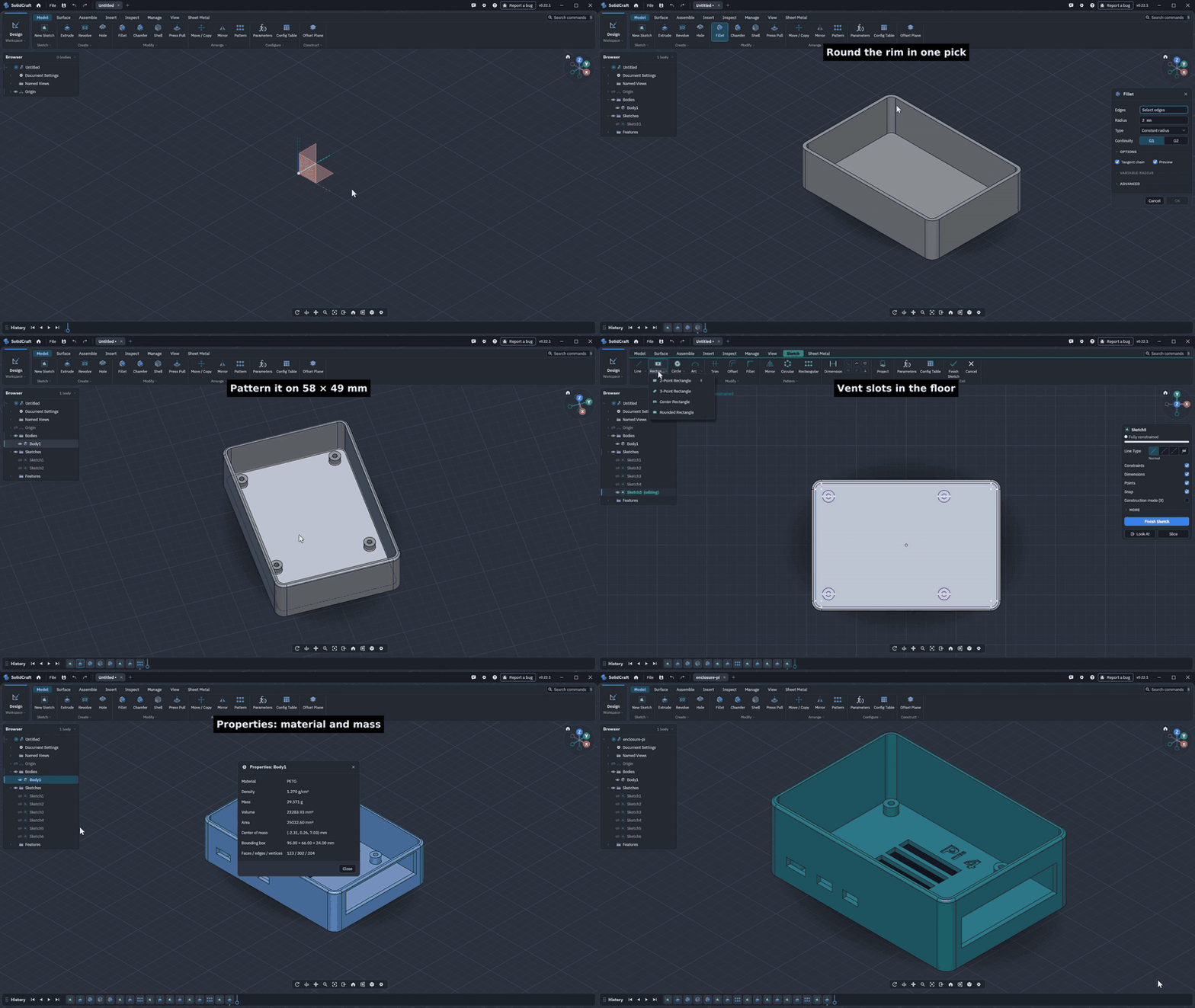
A Raspberry Pi 4 case from an empty design: a sketch dimensioned with the board's parameters, extrude, fillet, shell, the rim rounded in one pick, an M2.5 standoff patterned on the 58 × 49 mm hole rectangle, port cut-outs, vent slots, "Pi 4" engraved in DejaVu Sans Bold and a PETG material defined in the design, with its mass in Properties, then height 24 → 32 mm in Parameters and it all rebuilds. 6× playback with the idle pauses cut. Full video, recorded with the demo script.
Tải xuống
- Windows: cái trình cài đặt.
- macOS: cái disk image (Apple silicon and Intel).
- Linux: cái Hình ảnh ứng dụnghoặc
sudo snap install solidcraft(Snap Store). - Web: try it in your browser, no install.
ARM64 and 32-bit builds, portable zip, .deb, .rpm, Flatpak and the other packages are on the downloads page. The macOS app is signed with a Developer ID and notarized by Apple. The Windows files are unsigned for now (code signing and privacy), so SmartScreen may warn: choose More info, sau đó Run anyway. On SolidCraft 0.11 to 0.14, download once by hand; see updating.
What works
Early but usable for simple parts: 75 of 76 public reference parts match their analytic or FreeCAD-computed volume, area, centre of mass and bounding box (oracle); the other is a tracked bug.
- Sketches and constraints: lines, arcs, splines, text and more, solved by our own constraint solver, with parameter-driven dimensions.
- Tính năng: extrude, revolve, sweep, loft, fillet, chamfer, shell, draft, holes, threads, patterns, mirror, split and combine on an editable parametric timeline.
- Parameters and configurations with unit-aware expressions.
- Assemblies with joints, motion studies, contact sets, interference and mass properties.
- Sheet metal with flanges, hems, fold/unfold and flat patterns, and plastic enclosure features.
- Tập tin: STEP, IGES, 3MF, STL, OBJ and glTF in and out where supported, URDF export,
.scdesigns (.solidcraftfiles from earlier releases still open). - Desktop app, browser app, headless CLI and MCP server, all running the same commands.
The full list is in docs/capabilities.md và docs/features.md; status and plans are in ROADMAP.md. See also what people built, 3D mouse support và kiến trúc.
Xây dựng từ nguồn
cargo run --release -p solidcraft -- --sample      # desktop app with a sample part
cargo run --release -p solidcraft-cli -- commands  # the command registry
cargo run --release -p solidcraft-cli -- run examples/bracket.json --out bracket.step
cargo xtask ci                                     # fmt, clippy, tests, icons, assets, layers, wasm
More commands, the Windows cross-build and the browser build are in docs/building.md.
AI agents (MCP)
solidcraft-cli mcp là một Giao thức bối cảnh mô hình server. Headless it runs its own design session, or with --connect it drives the running app so you can watch. Claude Code: claude mcp add solidcraft -- solidcraft-cli mcp. If a terminal doesn't find
solidcraft-cli (older Windows installers don't put it on PATH), give its full path (by default
"C:\\Program Files\\SolidCraft\\solidcraft-cli.exe"). Tools, access rules and an example session:
docs/MCP.md.
Tập lệnh
A script is a JSON list of the same commands the UI runs, executed with solidcraft-cli run. Format and example: docs/scripts.md. Pages can also be driven through the
browser command API.
Plugins (experimental desktop runtime)
Plugins add separately distributed behaviour without compiling that behaviour into SolidCraft. The initial runtime loads WebAssembly components, explicitly requested by the user. Merely installing a folder, enabling it in Preferences, or opening a design never executes plugin code. The interface is experimental: WIT package craft:[email protected], capability [email protected] (plugins built for 0.1 still run). While it is 0.x a minor version may break the one before it; the host refuses a plugin that needs a capability it does not have, in plain words. Review a plugin again after an update. The desktop app and headless CLI use the same commands. Browser execution, automatic downloads and updates, custom panels, and plugin-defined parametric feature types are future work.
Install and inspect
A package is a folder named after its id, containing plugin.json và một .wasm component. Preferences > Plugins lists packages under the per-user data folder: %LOCALAPPDATA%/SolidCraft/plugins
on Windows, ~/Library/Application Support/SolidCraft/plugins on macOS, and
${XDG_DATA_HOME:-~/.local/share}/solidcraft/plugins on Linux. Show in folder opens this location. You can also inspect and explicitly run a package in another folder. Nothing is downloaded by the host.
A minimal manifest looks like this. Plugin packages and examples are maintained outside this repository, as specified in the plugin RFC.
{
  "id": "example-box",
  "name": "Example box",
  "version": "0.1.0",
  "description": "Create an ordinary editable box from dimensions.",
  "capabilities": ["[email protected]"],
  "runtime": {
    "module": "plugin.wasm",
    "entries": ["make"],
    "commands": ["solid.box"],
    "limits": {"fuel": 10000000, "memory_mib": 64, "deadline_ms": 5000}
  }
}
Chạy plugin.inspect với {"path":"/path/to/example-box"} through the CLI's JSON scripts, MCP
execute, or the desktop control channel's engine.execute. It reads the manifest and component without executing them, returning the declared commands, limits and an approval SHA-256 hash. Review the author, code and declared rights before using that hash. Inspection does not approve a package. Existing metadata-only packages remain listable but cannot run until they declare a runtime.
Run explicitly
After reviewing the inspected package, execute:
{
  "command": "plugin.run",
  "params": {
    "path": "/path/to/example-box",
    "approval": "<exact approval hash returned by plugin.inspect>",
    "entry": "make",
    "params": {"length": 20, "width": 10, "height": 3}
  }
}
For example, save that command in a JSON array and use solidcraft-cli run commands.json. For the running desktop app, send it as the command và params of a standalone
engine.execute request (see control protocol). The native host runs it on a worker and keeps the window responsive. Stop or a design change discards the pending result; the host does not automatically rerun external code. Desktop batches and scripts must send
plugin.run separately. Headless CLI scripts may include it as a normal command.
The hash binds both the exact manifest bytes and the component bytes, so an updated package requires a fresh inspection and permission review. It is a content identity, not a signature or an author's reputation. Agent chat asks before executing external plugin code. MCP and the control channel keep their existing file scopes: allow the package folder explicitly where needed. Naming a package never grants access to another folder.
User resource ceilings
The invocation defaults remain 10,000,000 fuel, 64 MiB of guest memory and 5000 ms. The default host ceilings remain 100,000,000,000 fuel and 128 MiB. A package can declare larger fuel or memory budgets, but execution is refused until you explicitly raise the host ceilings and approve that exact package content. plugin.inspect is inert and reports the requested limits, current host_limits, within_host_limits and any limits_error even when a request is too large.
In the native GUI, open Preferences > Plugins, nhập Max plugin fuel và Max plugin memory (MiB), sau đó chọn Áp dụng hoặc OK. Enter also accepts both values; Cancel reverts changes since the last Apply and Restore defaults resets this page. The settings persist in your user preferences and do not travel with saved designs.
For standalone CLI or headless MCP sessions, create a UTF-8 JSON file, for example
plugin-limits.json containing:
{"max_fuel": 200000000000, "max_memory_mib": 512}
Pass it explicitly when starting the process:
solidcraft-cli --plugin-limits plugin-limits.json run inspect-plugin.json --results
solidcraft-cli --plugin-limits plugin-limits.json mcp --headless --allow-path /path/to/plugins
Missing fields use the original host ceilings. Connected desktop sessions use the GUI's preferences; CLI settings cannot override them. Positive integer fuel values up to u64::MAX
are accepted without rounding. Guest memory is limited to 4096 MiB by the current Wasm32 ABI; that technical boundary requires a different runtime ABI to change. Neither setting changes a package's declared budget, executes it, adds permissions, or retries a failed invocation. Review its manifest and component, obtain the content approval hash, and explicitly invoke it. A changed manifest budget requires a fresh approval hash. Keep the selected ceilings within your machine's available resources; they are limits on guest execution, not total SolidCraft memory or native CAD work. The independent maximum execution deadline stays 30 seconds.
Standalone CLI runs and headless MCP use the plugins installed for the desktop app; approvals given there last for the run. Add --keep-plugin-approvals to keep them between runs, shared with the desktop app, so a plugin is installed and approved once, and --plugins-dir DIR to use a separate set of plugins and approvals, for example in CI. List kept approvals with
solidcraft-cli --keep-plugin-approvals exec plugin.grants and take one back with
solidcraft-cli --keep-plugin-approvals exec plugin.revoke '{"id":"PLUGIN_ID"}'
(Headless use).
Permissions, results and saved designs
A plugin can call any command in the MCP catalog whose exact id its manifest lists. Commands that reach past the open design are grouped: file (saving, exporting, importing, inserting from files, libraries), doc (opening or switching designs), app (settings, window, diagnostics) and plugin
(inspecting or running plugins). Each group is refused unless the manifest requests it in
runtime.permissions.command_groups and the user grants it; this version has no grant UI yet. Filesystem calls require matching manifest permissions and approved folder grants. The clock requires its manifest permission; otherwise it returns a fixed epoch. No WASI, socket or process API is linked. A design container reserves plugins/<plugin-id>/ for a plugin's own data, kept and saved back untouched when the plugin is missing; plugins cannot read or write it until the
storage capability arrives. Inspection commands can disclose model data, so review them as permissions too. In particular, the optional
model.mesh permission exposes the requested body's evaluated vertices and triangles in its owning component's coordinates (millimetres), with explicit transfer limits. It performs no conversion.
Edits run against an isolated copy of the design. Only a successful call is adopted, as one Undo step. A trap, exhausted fuel, memory limit, invalid result or refused host call discards the transaction, preserving the previous design and undo/redo history. The host validates produced native features before accepting them. A plugin that catches a refused host call cannot commit an earlier partial edit. CPU-heavy guest loops are bounded by fuel and a deadline; the guide explains the separate cost of compiling a component and executing a granted native command.
The result is ordinary native features: they save, undo, redo and rebuild without the plugin. Removing the package disables future invocations; it does not remove the features already created. Changing the plugin's own parameters means another invocation in this first version; there is no plugin-owned timeline evaluation hook yet. Turn an installed plugin off in Preferences > Plugins to refuse subsequent desktop calls. Disabling it or changing resource ceilings during a pending call prevents adoption. CLI processes have their own session policy and do not read the desktop app's preferences.
Xem runtime and author guide for the complete manifest, supported command boundary, limits, build options, tests and current restrictions. For step-by-step package checks and expected results, see the English test guide. The existing parametric plugin design remains a separate future phase.
Đóng góp
Help is welcome. ĐÓNG GÓP.md covers how to build and test, the code map, the clean-room and licence rules, and where help is wanted most. Open work is in vấn đề về GitHub; chat is on Bất hòa.
Nhà tài trợ
SolidCraft's continuous integration runs on Blacksmith, which sponsors its CI minutes.
Tuyên bố miễn trừ trách nhiệm
The files in this repository are provided as is, without warranty, liability or indemnity, and Tangency Labs and the contributors accept no responsibility for any harmful or unlawful use of them: read TUYÊN BỐ TỪ CHỐI TRÁCH NHIỆM.md.
Giấy phép
MIT OR Apache-2.0, at your option. Developed under the clean-room contribution rules; third-party code and assets retain their documented licences and attribution.
SolidCraft's brand and interface are licensed separately, under LICENSE-BRAND: the UI kit, the look (interface icons, glyphs, built-in themes), the theme's design tokens and palettes, and the SolidCraft name, logo and app icon. Use them freely as part of SolidCraft. Using them in another program or product needs the maintainers' written permission first.
SolidCraft is independent. Behaviour is designed from public documentation, general CAD conventions and user feedback. Reference tests use analytic values and open-source tools. SolidCraft is not affiliated with, sponsored by or endorsed by Autodesk, Dassault Systèmes, PTC, Siemens or any other CAD vendor. Fusion, AutoCAD, Inventor, SolidWorks, Onshape, Creo, Blender and Tinkercad are trademarks of their respective owners, named only to describe compatibility (see THÔNG BÁO).
Dự án cùng danh mục

Master programming by recreating your favorite technologies from scratch.

chương trình giảng dạy và cơ sở mã nguồn mở của freeCodeCamp.org. Học toán, lập trình và khoa học máy tính miễn phí.

Tìm hiểu cách thiết kế các hệ thống quy mô lớn. Chuẩn bị cho cuộc phỏng vấn thiết kế hệ thống. Bao gồm flashcards Anki.

Danh sách các dịch vụ mạng và ứng dụng web của Phần mềm miễn phí có thể được lưu trữ trên máy chủ của riêng bạn

Máy khách GUI hiện đại dựa trên Tauri, được thiết kế để chạy trong Windows, macOS và Linux để mang lại trải nghiệm proxy phù hợp

Trao quyền cho mọi người để xây dựng phần mềm đáng tin cậy và hiệu quả.