openai/whisper
Robust Speech Recognition via Large-Scale Weak Supervision
README
Thì thầm
[Blog] [Paper] [Model card] [Colab example]
Whisper is a general-purpose speech recognition model. It is trained on a large dataset of diverse audio and is also a multitasking model that can perform multilingual speech recognition, speech translation, and language identification.
Approach
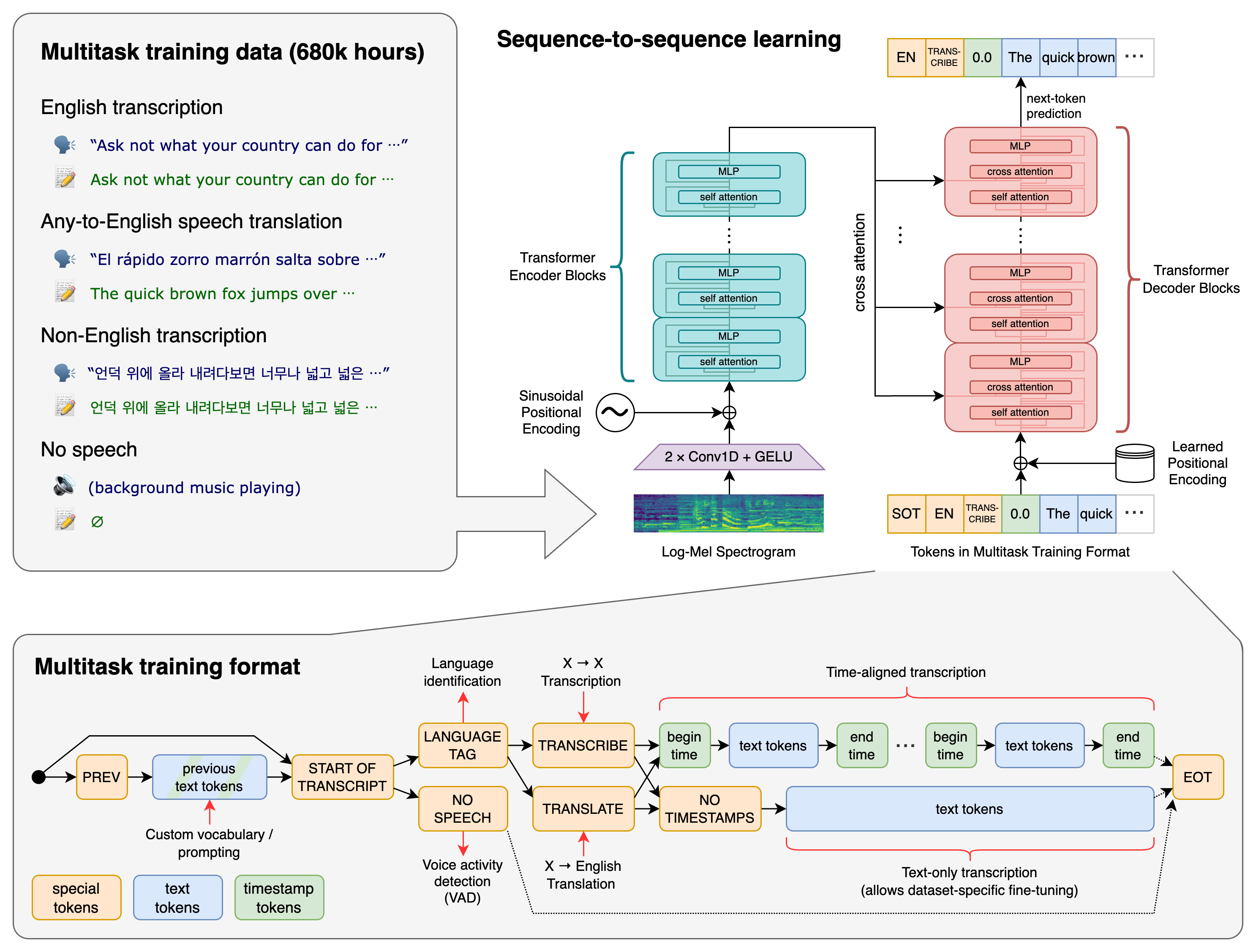
A Transformer sequence-to-sequence model is trained on various speech processing tasks, including multilingual speech recognition, speech translation, spoken language identification, and voice activity detection. These tasks are jointly represented as a sequence of tokens to be predicted by the decoder, allowing a single model to replace many stages of a traditional speech-processing pipeline. The multitask training format uses a set of special tokens that serve as task specifiers or classification targets.
thiết lập
We used Python 3.9.9 and PyTorch 1.10.1 to train and test our models, but the codebase is expected to be compatible with Python 3.8-3.11 and recent PyTorch versions. The codebase also depends on a few Python packages, most notably OpenAI's tiktoken for their fast tokenizer implementation. You can download and install (or update to) the latest release of Whisper with the following command:
pip install -U openai-whisper
Alternatively, the following command will pull and install the latest commit from this repository, along with its Python dependencies:
pip install git+https://github.com/openai/whisper.git
To update the package to the latest version of this repository, please run:
pip install --upgrade --no-deps --force-reinstall git+https://github.com/openai/whisper.git
It also requires the command-line tool ffmpeg to be installed on your system, which is available from most package managers:
# on Ubuntu or Debian
sudo apt update && sudo apt install ffmpeg

# on Arch Linux
sudo pacman -S ffmpeg

# on MacOS using Homebrew (https://brew.sh/)
brew install ffmpeg

# on Windows using Chocolatey (https://chocolatey.org/)
choco install ffmpeg

# on Windows using Scoop (https://scoop.sh/)
scoop install ffmpeg
You may need rust installed as well, in case tiktoken does not provide a pre-built wheel for your platform. If you see installation errors during the pip install command above, please follow the Trang bắt đầu to install Rust development environment. Additionally, you may need to configure the PATH environment variable, e.g. export PATH="$HOME/.cargo/bin:$PATH". If the installation fails with No module named 'setuptools_rust', you need to install setuptools_rust, e.g. by running:
pip install setuptools-rust
Available models and languages
There are six model sizes, four with English-only versions, offering speed and accuracy tradeoffs. Below are the names of the available models and their approximate memory requirements and inference speed relative to the large model. The relative speeds below are measured by transcribing English speech on a A100, and the real-world speed may vary significantly depending on many factors including the language, the speaking speed, and the available hardware.
| Kích thước | Thông số | English-only model | Multilingual model | Required VRAM | Relative speed |
|---|---|---|---|---|---|
| tiny | 39 M | tiny.en |
tiny |
~1 GB | ~10x |
| base | 74 M | base.en |
base |
~1 GB | ~7x |
| small | 244 M | small.en |
small |
~2 GB | ~4x |
| medium | 769 M | medium.en |
medium |
~5 GB | ~2x |
| large | 1550 M | không áp dụng | large |
~10 GB | 1x |
| turbo | 809 M | không áp dụng | turbo |
~6 GB | ~8x |
các .en models for English-only applications tend to perform better, especially for the tiny.en và base.en models. We observed that the difference becomes less significant for the small.en và medium.en models. Additionally, the turbo model is an optimized version of large-v3 that offers faster transcription speed with a minimal degradation in accuracy.
Whisper's performance varies widely depending on the language. The figure below shows a performance breakdown of large-v3 và large-v2 models by language, using WERs (word error rates) or CER (character error rates, shown in Italic) evaluated on the Common Voice 15 and Fleurs datasets. Additional WER/CER metrics corresponding to the other models and datasets can be found in Appendix D.1, D.2, and D.4 of the paper, as well as the BLEU (Bilingual Evaluation Understudy) scores for translation in Appendix D.3.
Command-line usage
The following command will transcribe speech in audio files, using the turbo model:
whisper audio.flac audio.mp3 audio.wav --model turbo
The default setting (which selects the turbo model) works well for transcribing English. However, cái turbo model is not trained for translation tasks. If you need to translate non-English speech into English, use one of the multilingual models (tiny, base, small, medium, large) instead of turbo.
For example, to transcribe an audio file containing non-English speech, you can specify the language:
whisper japanese.wav --language Japanese
Đến dịch speech into English, use:
whisper japanese.wav --model medium --language Japanese --task translate
Lưu ý: các
turbomodel will return the original language even if--task translateis specified. Usemediumhoặclargefor the best translation results.
Run the following to view all available options:
whisper --help
Xem tokenizer.py for the list of all available languages.
Python usage
Transcription can also be performed within Python:
import whisper

model = whisper.load_model("turbo")
result = model.transcribe("audio.mp3")
print(result["text"])
Internally, the transcribe() method reads the entire file and processes the audio with a sliding 30-second window, performing autoregressive sequence-to-sequence predictions on each window.
Below is an example usage of whisper.detect_language() và whisper.decode() which provide lower-level access to the model.
import whisper

model = whisper.load_model("turbo")

# load audio and pad/trim it to fit 30 seconds
audio = whisper.load_audio("audio.mp3")
audio = whisper.pad_or_trim(audio)

# make log-Mel spectrogram and move to the same device as the model
mel = whisper.log_mel_spectrogram(audio, n_mels=model.dims.n_mels).to(model.device)

# detect the spoken language
_, probs = model.detect_language(mel)
print(f"Detected language: {max(probs, key=probs.get)}")

# decode the audio
options = whisper.DecodingOptions()
result = whisper.decode(model, mel, options)

# print the recognized text
print(result.text)
Thêm ví dụ
Please use the 🙌 Show and tell category in Discussions for sharing more example usages of Whisper and third-party extensions such as web demos, integrations with other tools, ports for different platforms, etc.
Giấy phép
Whisper's code and model weights are released under the MIT License. See GIẤY PHÉP for further details.
Dự án cùng danh mục

JavaScript Thư viện 3D.

Spotify, native and fast. One lightweight Rust app for your whole library, local playback, and Spotify Connect on Linux, macOS, and Windows.
chuyển văn bản thành giọng nói
nhận dạng giọng nói tự động
nhận dạng giọng nói tự động
chuyển văn bản thành giọng nói