bilawalsidhu/gods-eye-view
Trình mô phỏng vệ tinh gián điệp trong trình duyệt của bạn, ngoại trừ dữ liệu là có thật. Trí thông minh không gian nguồn mở trực tiếp trên quả địa cầu 3D quang học.
README
🌐 Tầm nhìn của Chúa
Official site: godseyeview.ai · Tải xuống · hướng dẫn · phát hành · Hosted version waitlist · Phương tiện truyền thông




A spy-satellite simulator in your browser. Except the data is real.
The window through which we see our world.
Click any satellite, plane, ship or public camera and you can track it. Turn on FLIR mode and suddenly you're wondering, holy crap, is this real? And it's free, and open source.
One-click install with Pinokio · Run it from the terminal · Hosted version waitlist
God's Eye View™ là nhãn hiệu của Metaversity LLC, được Halfpixel, Inc. sử dụng theo giấy phép. Official download page.
🏆 #1 on GitHub Trending, daily and weekly · #8 Sản phẩm của ngày, hunted by Chris Messina · “khá tuyệt” — Brendan Eich, creator of JavaScript · Featured on Pinokio
▶️ From the project behind the God's Eye View series (trước đây là WorldView) — 25M+ views on YouTube
As seen on Matt Wolfe · Riley Brown · Digg · The Escapist · UNILAD Tech · Al Jazeera · NDTV · Mojo Story · all media
Bắt đầu nhanh · Nó làm gì · Năm phút đầu tiên · Nói chuyện với nó · Có gì trực tiếp · Chìa khóa & Chi phí · Đóng góp
🌍 Tại sao điều này tồn tại
God's Eye View đưa các tín hiệu công khai vào một thế giới có thể khám phá được. Theo dõi thế giới trực tiếp. Nói chuyện với nó. Phá vỡ nó. Mở rộng nó.
Bộ tiếp sóng chuyến bay, đèn hiệu tàu, các yếu tố quỹ đạo, máy ghi địa chấn và camera công cộng đã cho chúng ta biết rất nhiều điều về thế giới. God's Eye View đặt chúng ở cùng một vị trí, do đó bạn có thể di chuyển giữa một bức tranh toàn cầu và một chiếc máy bay, con tàu hoặc đường phố riêng lẻ. Nó chạy cục bộ trong trình duyệt của bạn, với mã nguồn mà bạn có thể kiểm tra và mở rộng.
Một nửa điều kỳ diệu là nó trông giống như một buồng lái bị cấm. Nửa còn lại là mọi dòng mã đều có thể kiểm tra được.
Hầu hết các nguồn cấp dữ liệu đều trực tiếp hoặc được làm mới thường xuyên. Giao thông được mô phỏng dọc theo đường thực bằng cách sử dụng dữ liệu vị trí tổng hợp. Tư thế của camera CCTV và quỹ đạo phóng tên lửa chỉ là những ước tính thô.
Bắt đầu với các nguồn dữ liệu đi kèm, sau đó thêm nguồn dữ liệu của riêng bạn. Mỗi lớp là một mô-đun riêng biệt.
🎛️ Thứ này có tác dụng gì
The world is already broadcasting. We fuse it together into a 3D globe for you and your agents.
We've got a plurality of sensor systems watching the planet right now. Satellite imagery, flights, ships, weather, public cameras. Each captures a sliver of what's happening. God's Eye View pulls that treasure trove of public data into a single picture.
 Ask the planet Use voice to ask the planet questions in natural language, and it annotates the 3D globe with the answer. |
 Flights and vessels Click on a satellite, plane, ship or public camera and you can track it. |
 Vệ tinh Toggle on different kinds of satellites, everything from GPS to Starlink. |
 Public cameras Some layers, like traffic and camera poses, are estimates, and the app says so. |
 Buồng lái Visualize a flight from the third-person perspective and jump into a rendered cockpit view. |
 World class weather Clouds, rain radar, lightning density and cyclone tracks with forecast cones. And since we say 4D, you can scrub the cloud imagery backwards in time. |
 Recent imagery Draw a bounding box around a fire and it'll retrieve the Sentinel-2 images, draped on the 3D terrain. All keyless, ladies and gentlemen. |
 Quá cảnh Click a bus in Boston and it starts leaving a trail. This might be the most overkill way to track your bus. |
 RF and SDR support Now you can connect your own SDR and visualize everything you're detecting. The SDR nerds know all the other possibilities. |
 World radio Ask for radio near anywhere and the globe starts broadcasting. Drag the tuner across up to 750 stations. |
 máy chủ MCP We've built MCP access so your agents can query the same picture and add their findings to a shared canvas. |
 Director Mode Draw outlines, sketch paths, drop your annotations on the map. |
Mọi thứ khác nó làm
- 🛩️ View buồng lái: Đi trong chuyến bay được theo dõi - máy ảnh sẽ ghi lại địa hình bên dưới bạn suốt chặng đường.
- 📡 Liên hệ: Danh sách dài 250 km về mọi thứ gần mục tiêu của bạn — bước qua máy bay đang hoạt động và vào bất kỳ buồng lái nào.
- 🎯 Nhấp để theo dõi bất cứ điều gì: Camera khóa, vẽ một vệt mờ dần, hiển thị siêu dữ liệu đầy đủ — và ngọn lửa hoặc bình chứa được theo dõi sẽ đưa bạn đến camera trực tiếp gần nhất chỉ bằng một cú nhấp chuột.
- 🖊️ Bảng trắng thoại: Đọc các chú thích trên thế giới - đa giác, điểm đánh dấu và tuyến đường ranh giới thực.
- 🛫 3D fleet: 122 procedural models drawn life size by type — airliners, business jets, helicopters, drones, ships, buses, trams and trains — and every contact within 3 km of the camera swaps from glyph to its 3D model.
- 🎨 Reskin thực tế: GLSL sensor looks over the normal globe — CRT, NVG, FLIR/thermal, Noir.
- 🟩 Lớp phủ phát hiện: Các hộp và ID giới hạn không gian màn hình trên mọi thứ trong chế độ xem.
- 🎖️ HUD quân sự: Màn hình hiển thị chiến thuật với khả năng đo từ xa theo phong cách thông minh.
- 🌐 Bối cảnh toàn cầu: Đưa ra bức tranh tình huống đầy đủ chỉ bằng một nút chuyển — và lấy lại chế độ xem chính xác khi bạn rời đi.
- 🎥 Đạo diễn cảnh: Ghi lại các chuyến tham quan bằng máy ảnh điện ảnh để làm clip và trình diễn.
- 🔗 Chia sẻ liên kết: Máy ảnh, kiểu, lớp và thậm chí một mục tiêu được theo dõi sẽ tuần tự hóa thành một URL — mục tiêu trực tiếp là một vật chuyển giao chứ không phải một dấu trang.
- 🏠 Đặt lại quả cầu: Một điều khiển — hoặc một câu — quay trở lại Trái đất đầy đủ.
- 🌦️ Thời tiết: Tạo hoạt ảnh dự báo gió của GFS hoặc ECMWF, phát lại radar, đám mây vệ tinh và tia chớp được quan sát trên một dòng thời gian và theo dõi các đường đi của cơn bão NHC/CPHC và JTWC. Không cần chìa khóa.
- 📷 Máy ảnh ALPR được ánh xạ: License-plate-reader camera locations tagged in OpenStreetMap, one city at a time. Locations and tags only; no key needed.
- 🔭 Vé vệ tinh: Ask by voice when any loaded satellite next rises over you: rise, peak and set times, and whether you can see it.
- 🔎 Nhà phân tích trả lời: Count, filter and rank satellites, datacenters and dams by voice, alongside flights, ships, fires and quakes; answers say when a feed is stale or on a fallback.
- 🧭 Nghiêng và Hướng Bắc Lên: Switch between straight-down and a 35° oblique, or put north at the top, while a tracked target stays centered.
- 🔍 Tìm kiếm không cần chìa khóa: Type decimal coordinates, a two-dimensional WGS84
geo:URI (for example,geo:39.7392,-104.9903), or a bundled city or landmark to fly there with no geocoder request; other names use Google when configured, then Photon and Nominatim. - 📦 Cảnh có thể chia sẻ: Import, preview and share Director scenes as files or bundles, with camera anchors, authored moves and data packs.
- 🌊 Cảnh lũ lụt ở Nepal: Replay the Bhote Koshi flood: flood path, witness sources and before-and-after imagery (bundled data is non-commercial; see DATA_SOURCES.md).
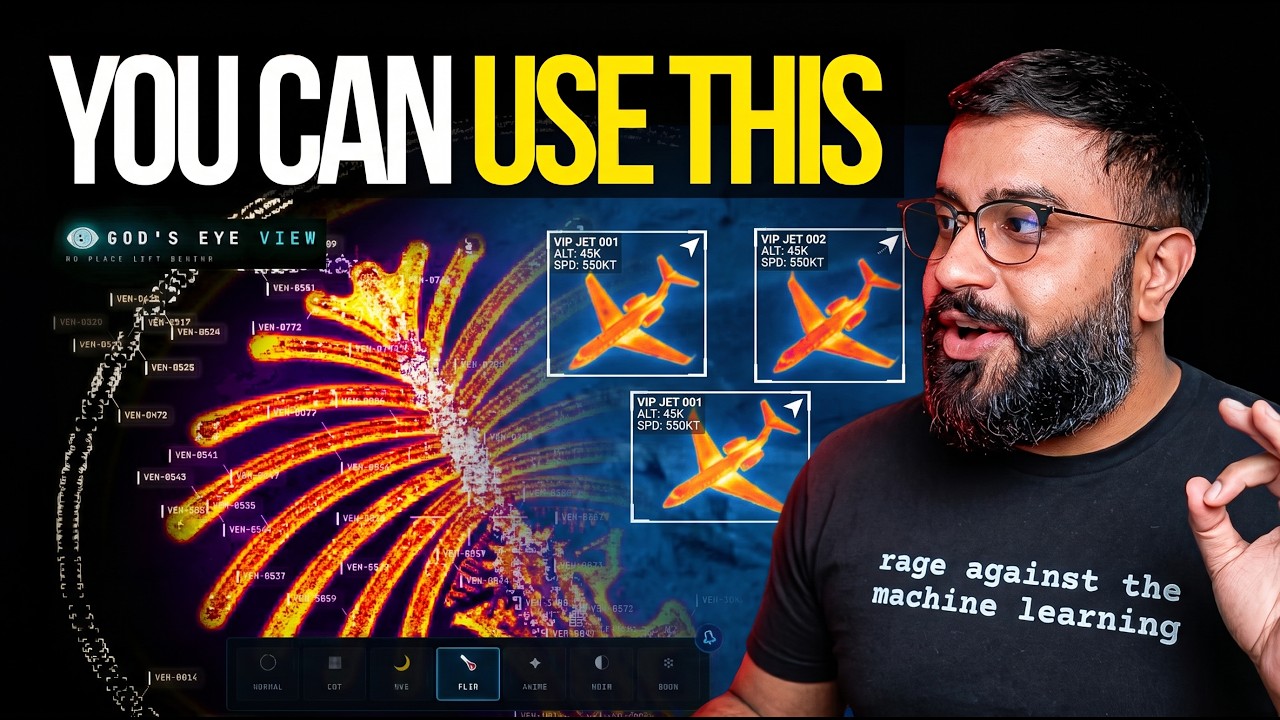
⚡ Quick Start
Local setup needs no account or API keys. The app opens with Esri satellite imagery and keyless terrain. OSM is the fallback if Esri is unreachable. Flights, military traffic, satellites, earthquakes, public cameras, radio, and launches are available without keys.
Đối với ảnh 3D chân thực, hãy thêm một Mã thông báo ion Caesium cho mục đích sử dụng cá nhân, phi thương mại đủ điều kiện hoặc Phím Google Maps cho tuyến đường trực tiếp, có đồng hồ đo và tìm kiếm địa điểm trên Google. Các điều khoản và hạn ngạch của nhà cung cấp được áp dụng. Thêm khóa thông qua ứng dụng BẬT ĐIỆN bảng điều khiển; Chìa khóa & Chi phí giải thích các lựa chọn.
Đã cài đặt chưa? Cập nhật lên phiên bản mới nhất. Các phiên bản cũ hơn truy vấn các máy chủ OpenStreetMap Overpass công khai, hiện từ chối chúng, vì vậy Lưu lượng truy cập, Cài đặt đã ánh xạ và ALPR vẫn trống cho đến khi bạn cập nhật.
Đường dẫn 1 — Một cú nhấp chuột, không cần thiết bị đầu cuối
- Cài đặt hoặc cập nhật Pinokio để 8.2 trở lên.
- Mở Tầm nhìn của Chúa ở Pinokio.
- nhấp chuột cài đặt, sau đó Bắt đầu.
Có sẵn trên Windows, macOS và Linux. The Pinokio maintainer reports cross-platform testing of the fixed installer. The launcher installs the locked dependencies, finds a free local port, and opens the app in your system browser. The Server menu item keeps the launcher console available.
Đã thử trước và cài đặt không thành công? Hãy cập nhật Pinokio và thử lại. Phiên bản 8.2 khắc phục sự cố cài đặt trình khởi chạy; chi tiết từ người bảo trì Pinokio.
Using an older launcher or opening the embedded view manually? If the globe is very choppy, before treating that as a GPU compatibility or minimum-hardware problem, copy the local server URL shown by Pinokio and open the same URL in your normal hardware-accelerated browser. One Pinokio 8.2.0 user reported severe stutter in Pinokio's embedded view that went away when the same running server was opened in an external browser (#365). That points to the embedded browser rather than the app server or your hardware; it does not establish a minimum GPU requirement.
Đường dẫn 2 - Thiết bị đầu cuối/tác nhân mã hóa
sử dụng Node.js 24.x (24.14.0 trở lên) hoặc 26.x; 24.22.1 or later (26.12.1 or later on 26) includes the October 21, 2026 security fixes, among them CVE-2026-111497. The setup doctor warns about Node 25, which is end-of-life.
git clone https://github.com/bilawalsidhu/gods-eye-view.git
cd gods-eye-view
npm ci
npm run doctor
npm run dev
Mở http://localhost:4173. chọn Danh bạ trực tiếp, Nhiệm vụ không gian,
Môi trườnghoặc Khám phá thủ công từ bảng điều khiển chạy đầu tiên.
Hiệu suất khởi động
Quá trình chụp M5/Chrome tại thời điểm đo được thời gian khởi động nguội trung bình là 1,86 giây. Đây là đường cơ sở so sánh, không phải là sự đảm bảo cho máy hoặc kết nối của bạn. Xem docs/PERFORMANCE.md.
phím tắt macOS: ./scripts/dev-fresh.sh xóa bộ nhớ đệm Vite và lấy mọi khóa đã định cấu hình ngay từ Chuỗi khóa. Nó cũng khởi động mà không cần chìa khóa.
Path 3 — Docker
No Node install needed; the container publishes the same dev server.
git clone https://github.com/bilawalsidhu/gods-eye-view.git
cd gods-eye-view
docker compose up
Mở http://localhost:4173 as above. Everything the app saves stays in the folder you cloned, so docker compose down never loses anything:
.env- your API keys, whether saved from Provider Settings or typed in by hand.gev-cache/- downloaded map and satellite data, so later starts are faster.gev-logs/- logs
Back up that folder and you've backed up everything; delete .env to forget your keys. Source edits still hot-reload. The port is published to 127.0.0.1 only, so the default matches the native one.
The local MCP server and ChatGPT OAuth voice are not available under Docker; use an OpenAI API key for voice.
Publishing it wider is the Sharing an instance opt-in, and it hands out Provider Settings too: the launcher trusts the container gateway as this machine, and a wider publish delivers everyone else from that same address. For an instance you mean to share, put the keys in .env by hand instead. BẢO MẬT.md has the detail.
When you widen the publish, also set GEV_KEY_SETUP_TRUSTED_PEERS=none so the launcher trusts no gateway address.
GEV_KEY_SETUP_TRUSTED_PEERS=none docker compose up
Compose forwards GEV_KEY_SETUP_TRUSTED_PEERS và GEV_ALLOWED_HOSTS from your shell or the project's .env; an exported shell value takes precedence. You can also put GEV_KEY_SETUP_TRUSTED_PEERS=none trong .env for a persistent setting. Unset or blank trusted peers retain automatic gateway discovery; none explicitly disables it. The startup log confirms that no additional peers are trusted.
Running on Linux, a NAS, or behind a reverse proxy
Run it as the user who should own the files it writes. id shows the numbers; for yourself on Linux:
env UID=$(id -u) GID=$(id -g) docker compose up
On a NAS, clone onto the share you want the data on and use the share owner's ids:
cd /volume1/docker
git clone https://github.com/bilawalsidhu/gods-eye-view.git
cd gods-eye-view
env UID=1026 GID=100 docker compose up -d
Keep the env: bash treats UID as read-only, so a plain UID=1026 in front of a command is silently ignored. If the container can't write the checkout, it says so at start. Docker Desktop on macOS and Windows maps ownership for you.
On SELinux hosts (Fedora, RHEL), compose mounts the checkout with :z so the container may read it; Docker may relabel the checkout for container access, which can take a moment on a large checkout. Without that, the start fails with Cannot find module '/app/scripts/docker-start.mjs'.
Behind a reverse proxy, put your keys in .env or pass them as environment variables - Provider Settings and the News layer refuse proxied requests on purpose - and add the hostname you serve it on, for example GEV_ALLOWED_HOSTS=globe.example.lan (xem Sharing an instance). The map routes compare the browser's Origin với Host the server sees, so the proxy must pass the original Host and, when it terminates TLS, X-Forwarded-Proto. Caddy does both by default; for nginx add proxy_set_header Host $http_host;, proxy_set_header X-Forwarded-Proto $scheme; và proxy_set_header X-Forwarded-For $proxy_add_x_forwarded_for;. On an install outside Docker, that forwarding header also rate-limits the proxy's users apart from your own browser. Under the default Docker bridge network every client on the host, your browser included, reaches the container from its gateway address and shares one Overpass bucket.
IPv6-only networks, rebuilding, and the test suites
The launcher reads the IPv4 default gateway, so an IPv6-only Docker network finds none: it logs No default gateway; Provider Settings stays loopback-only
and the panel refuses every save. Put your keys in .env by hand there, or name the gateway yourself with GEV_KEY_SETUP_TRUSTED_PEERS after reading
BẢO MẬT.md.
node_modules deliberately stays inside the image, so it survives in an anonymous volume across restarts: after a git pull that changes dependencies, recreate it with docker compose down -v && docker compose up --build. The image also skips Puppeteer's Chromium download, which keeps it small but leaves
npm run test:track to the host — npm run build và npm test run fine in the container.
Path 4 — GitHub Codespaces (cloud, no local install)
Codespaces requires a GitHub account. Overpass queries, the News layer and OpenAI voice token requests return HTTP 403 through its forwarded HTTPS URL, even with API keys in .env và GEV_ALLOWED_HOSTS configured. Use a local setup for these features.
The codespace runs the dev server in a cloud workspace, so Node and the dependencies never touch your machine. The globe still renders in your own browser, so it needs the same graphics there as any other path. GitHub Free includes 120 core-hours a month with no card on file — about 60 hours on the default 2-core machine. Org and Enterprise plans include no free quota; current terms and quotas apply.
- Fork this repository, then open your fork on GitHub.
- Click the green Code button, the Codespaces tab, then Create codespace on main.
- In the codespace terminal:
nvm install 24 && nvm use 24 npm ci npm run doctor GEV_ALLOWED_HOSTS="$CODESPACE_NAME-4173.$GITHUB_CODESPACES_PORT_FORWARDING_DOMAIN" npm run dev - Mở Ports tab, find
4173, and click the globe icon to open it in the browser. The port is private by default, so the URL asks for your GitHub login. Keep it private: a public port lets anyone use the app and the keys in your.env.
GEV_ALLOWED_HOSTS there is required, not optional. The dev server answers only the hostnames it trusts, and a forwarded port arrives on
$CODESPACE_NAME-4173.$GITHUB_CODESPACES_PORT_FORWARDING_DOMAIN. Without it the page is Blocked request. This host is not allowed. Leading-dot wildcards are ignored on purpose, so pass that exact name.
⚠️ A codespace is reachable from the internet. Treat it as the wider-publish case in Sharing an instance. Provider Settings is unavailable on the forwarded URL. Never commit your workspace
.env. BẢO MẬT.md has the threat model.
Sau đó bật nguồn - trong ứng dụng, không phải trong tệp
For a local setup, keys are upgrades, not prerequisites. When you want one, click the BẬT ĐIỆN chip ở góc dưới bên phải: Cài đặt nhà cung cấp liệt kê mọi khóa được hỗ trợ, nội dung nó bật và nơi lấy nó. Dán, đánh LƯU PHÍMvà ứng dụng sẽ tự khởi động lại với tính năng mới được bật. Khi mọi thứ đã được cấu hình, chip sẽ đọc CẤP ĐIỆN LÊN — và nếu bố cục nhỏ gọn che giấu nó, ?setup=1
mở lại cùng một bảng điều khiển.
- Nơi chìa khóa hạ cánh: Pinokio → ứng dụng bị bỏ qua
pinokio/ENVIRONMENT; một bản sao thiết bị đầu cuối → repo-root.env. Một trong hai tệp được tạo chỉ dành cho chủ sở hữu trước đây một bí mật được viết vào đó. Đây là các tệp văn bản gốc cục bộ, được loại trừ khỏi Git; ứng dụng sử dụng chìa khóa của bạn để liên hệ với nhà cung cấp. - Chìa khóa bạn đã có vẫn là của bạn: các giá trị từ trình bao của bạn hoặc Chuỗi khóa macOS hiển thị dưới dạng được cấu hình bên ngoài và chỉ đọc cho bảng điều khiển.
- Nhận gì đầu tiên: miễn phí Ion Caesium mã thông báo (sử dụng cá nhân, phi thương mại đủ điều kiện; áp dụng các điều khoản và hạn ngạch hiện tại) cho địa hình thế giới và 3D quang học; khóa Google Maps chỉ dành cho tuyến đường được tính phí, có đồng hồ đo + tìm kiếm địa điểm trên Google; OpenAI khi bạn muốn nói chuyện với thế giới. Bản đồ đầy đủ, bao gồm chi phí, trong Chìa khóa & Chi phí.
Phiên bản Pinokio cũ hơn và bộ lưu trữ thông tin xác thực
Không nhập thông tin xác thực bằng ngôn ngữ gốc của Pinokio 8.0.40 Cấu hình bảng điều khiển: bản phát hành đó không lưu chính xác tệp ứng dụng lồng nhau này và ghi lại các giá trị đã gửi. sử dụng BẬT NGUỒN → Cài đặt nhà cung cấp thay vào đó là bên trong GEV. Thông báo Pinokio 8.2 sửa lỗi cài đặt; nó không chứng minh rằng vấn đề Cấu hình riêng biệt này đã được giải quyết. Trên macOS, Chuỗi khóa thông qua
./scripts/dev-fresh.sh vẫn là lựa chọn lưu trữ mạnh mẽ hơn.
Máy chủ liên kết với localhost trên cả hai đường dẫn và Cài đặt nhà cung cấp chỉ trả lời các yêu cầu từ máy của bạn. Các khóa phía trình duyệt (Google Maps, ion Caesium) phải bị hạn chế tại nhà cung cấp của họ - BẢO MẬT.md chỉ ra cách thức và nó mang theo các quy tắc chia sẻ mạng LAN cùng với Chìa khóa & Chi phí.
🕐 Năm phút đầu tiên
Choose a first-run mission, or try these in order. Your starting basemap depends on the keys you've added.
Thắp sáng bầu trời. Lấy Danh bạ trực tiếp nhiệm vụ (hoặc bật Chuyến bay chính bạn) - hàng ngàn máy bay trực tiếp, lướt trên thiết bị đo từ xa thực, lưới phát hiện đã đọc được hiện trường. Nhấp vào một nút: máy ảnh sẽ khóa, một vệt vẽ phía sau nó và thẻ đo từ xa trực tiếp của nó sẽ xuất hiện.
Hãy kiểm soát. đánh buồng lái trên chiếc máy bay được theo dõi của bạn và lái nó xuống, chuyển đổi cảm biến giữa chuyến bay: NVG thành Ironbow FLIR.
Thả mình vào một sân bay bận rộn. Tìm kiếm một và đi xuống đường lăn với 3D máy bay bật - các điểm tiếp xúc được nối đất, các vệt taxi, toàn bộ sân đỗ hoạt động trong thời gian thực.
Nhìn qua camera công cộng. Bật Cameras qua Austin, London, California, Phần Lan hoặc Delaware (video trực tiếp). Nguồn cấp dữ liệu không được nhúng vào webcam — chúng chiếu vào thành phố 3D. Chu kỳ bảo hiểm đến ĐÃ XEM và mọi camera đều rút ra phạm vi phủ sóng ước tính của nó - nơi nó tiếp cận và nơi nó bị mù.
Theo dõi thứ gì đó trên quỹ đạo. Bật Vệ tinh và nhấp vào ISS - bạn đi dọc theo khoảng cách quỹ đạo, vòng quỹ đạo và tất cả.
Chuyển đổi quang học. Nhấn vào
1–6— CRT, NVG, FLIR — và toàn bộ hành tinh sống được hiển thị lại thông qua một cảm biến khác.Nói chuyện với nó (cần khóa OpenAI): "Đưa tôi đến LAX và chọn chiếc máy bay trên không gần nhất."
Về nhà đi. đánh Đặt lại quả địa cầu - hoặc chỉ nói "thu nhỏ chế độ xem toàn cầu."
Bàn phím: 1–6 phong cách trực quan · H HUD · D phát hiện · C CCTV · ` frame rate · Esc ngoài. Chụm bàn di chuột để phóng to hình ảnh địa cầu.
🎙️ Nói chuyện với nó
Providers, chat, ChatGPT OAuth and the voice check
The standalone app offers OpenAI và Gemini dưới AI Provider in Settings, one choice shared by voice and chat. OpenAI is the initial default; your choice is saved in this browser. To use Gemini, add GEMINI_API_KEY in Provider Settings or your local .env file, then select Gemini. GEMINI_LIVE_MODEL mặc định là gemini-3.8-live. The permanent key stays on the local server, which issues a constrained, single-use session credential.
Changing provider ends the current conversation. If voice is on, the new provider starts with the same open-mic or push-to-talk mode; a held Space key is not carried over. Gemini uses the same map actions and captions, but has no OpenAI cost meter or MINI tier. When Gemini reports that its session has expired, start voice again for a new conversation. The AI Provider setting does not change the OpenAI-backed AI HUD summary.
Next to the mic, CHAT opens a typed chat with silent replies. It uses the selected provider and the same map actions, and never asks for the microphone. OpenAI chat needs an API key (OPENAI_CHAT_MODEL), so it is off while GEV_PREFER_CODEX_OAUTH pins OpenAI to ChatGPT OAuth; Gemini chat uses a separate text model (GEMINI_CHAT_MODEL). Chat and voice panels share the left panels' glass surface and sit above the dock or dock to the right.
Voice can use an Phím OpenAI API or, on the same machine, an opt-in signed-in ChatGPT/Codex OAuth session. The API-key path remains the default. Selecting ChatGPT OAuth in Provider Settings reuses an existing local sign-in or starts the Codex browser sign-in flow and selects OAuth when it completes. The OpenAI key still drives the Tóm tắt AI HUD: bản đọc ngắn gọn, theo phong cách thông minh gồm năm từ về chế độ xem hiện tại sẽ tái tạo khi bạn di chuyển.
The OAuth option is experimental. OpenAI documents ChatGPT plan usage for the Responses API; a supported third-party Realtime contract for reusing Codex tokens has not been confirmed. A successful token mint does not establish billing or support terms.
GEV reads Codex's file credentials but does not write or refresh them. It checks token shape and expiry, and reports expired sign-in as requiring re-authentication. The login button runs codex login, permits one pending attempt, and reports exit failures or a two-minute timeout. CODEX_HOME must match the directory that Codex uses. If CODEX_AUTH_JSON points elsewhere, sign in separately or fix that mismatch before using the button. Codex credential storage must use auth.json; Keychain-only and in-memory storage are not readable by GEV. On Windows, the login button may not be able to start an npm-installed Codex; run codex login yourself, then select OAuth. See Codex credential storage.
For a live voice check, run node scripts/qa-voice-auth.mjs http://127.0.0.1:4189 oauth microphone.wav against your local dev server. Use a WAV with three seconds of leading silence followed by a short spoken reply request. Replace oauth với api-key to check the API-key path. The check verifies audio input, a completed spoken reply, usage, resource cleanup, and reconnect. It saves screenshots and credential-free results under .gev-logs/voice-auth/.
nhấp chuột GEV MIC, đưa micrô và chỉ nói chuyện. Đây không chỉ là một chiếc điều khiển từ xa được điều khiển bằng giọng nói:
- 🧠 Nó biết nó đang nhìn gì. Nhân viên hỗ trợ lấy bối cảnh cảnh trực tiếp trước khi trả lời — bao gồm tọa độ, tên đường, lớp hoạt động và tỷ lệ khung nhìn. Hỏi "Đây là thành phố nào?" giữa chuyến bay và nó biết.
- 🎯 Hỏi đáp thực thể. Nhấp vào bất kỳ máy bay, tàu hoặc trung tâm dữ liệu nào và hỏi "Cái gì thế này?" Nó trả lời bằng cách sử dụng phép đo từ xa trực tiếp của đối tượng.
- 👁️ Nền tảng trực quan. Ở cấp độ đường phố, nó đọc ảnh chụp màn hình khung nhìn để xác định các biển báo và tên tòa nhà dễ đọc, đồng thời được hướng dẫn không bao giờ gây ảo giác cho các nhãn.
- 🎬 Khung hình điện ảnh. "Cho tôi xem những chiếc máy bay trên đầu" kéo camera lại, nghiêng nó và đóng khung giao thông trực tiếp như một đạo diễn.
- 🔒 Trung thực và an toàn. Tác nhân chỉ xác nhận các hành động đã thành công. của bạn
OPENAI_API_KEYnever touches the browser; the client only gets a short-lived session token. If you choose USE CHATGPT OAUTH in Provider Settings, the local server uses that sign-in only to mint the same kind of short-lived Realtime credential, and refuses the OAuth path for non-loopback clients.
Thirty-five tools (thirty-four unless an Overpass server is set), four jobs — the commands below come straight from the product's voice test suite and tool playbook:
🎥 Chỉ đạo nó - động từ máy ảnh của người điều khiển máy bay không người lái:
“Rotate the globe” spins Earth to the right continuously; ask for left, a speed, or stop. If it refuses, follow its reset-and-rotate or further-zoom guidance; camera input stops rotation.
🗣️ "Đưa tôi tới Tokyo." · "Quay quanh khu vực này một cách chậm rãi." · “Hãy vẽ đường đi bộ từ Capitol đến Công viên Zilker.” → "Bay theo lộ trình chúng ta vừa vẽ." · "Thu nhỏ chế độ xem toàn cầu."
🖊️ Chú thích nó - một tấm bảng trắng trên thế giới thực:
🗣️ “Phác thảo tiểu bang Texas.” · "Chú thích Tòa nhà Đại hội Bang Texas và khuôn viên của nó" - nó vẽ ra ranh giới bao quanh thực tế, không phải là một vòng tròn. · "Tháp Eiffel cách bảo tàng Louvre bao xa?" — một mũi tên kết nối xuất hiện và nó cho biết khoảng cách. Mọi thứ vẫn tồn tại cho đến khi bạn nói "Xóa bản đồ."
✍️ Hoặc tự vẽ — UTILITIES ▸ Vẽ: pick Area, Line or Pin and a colour, click the vertices on the real world, double-click to finish, then name, recolour, hide or fly to each shape from its row. Same whiteboard, same persistence, no microphone needed.
🔎 Hãy thẩm vấn nó - truy vấn của nhà phân tích đối với các lớp trực tiếp:
🗣️ "Hiện tại có bao nhiêu chuyến bay qua Texas?" · “Những con tàu nào đang hướng tới Oakland?” · "Ngọn lửa lớn nhất gần Los Angeles là gì?" · “Có thứ gì bay được trên 40.000 feet không?” · "Khi nào ISS sẽ đi qua tiếp theo?" · "Có bao nhiêu trung tâm dữ liệu được xem?"
🎛️ Vận hành nó — toàn bộ bảng điều khiển, rảnh tay:
🗣️ "Chuyển sang tầm nhìn ban đêm và bật lớp chuyến bay." · "Bật góc nhìn của camera." · "Phát đài phát thanh tin tức gần Austin." · "Theo dõi chiếc máy bay đó." → "Vào buồng lái."
Và cấp độ bắn nhanh - mỗi câu một câu:
🗣️ "Cho tôi xem cơ sở hạ tầng toàn cầu." (sắp xếp các lớp và kéo trở lại quả địa cầu) · "Chơi theo dõi quỹ đạo." (một cảnh phim đầy đủ) · "Đặt mật độ phát hiện ở mức 50 phần trăm." · "Người liên hệ tiếp theo - chỉ có trực thăng." (giữa buồng lái) · "Cho tôi xem các nhiệm vụ không gian." · "Chuyển sang OSM." · "Làm sắc nét hình ảnh một chạm." · "Chuyển sang bố trí chiến thuật." · "Hiện tại cái gì đang được bật?"
💬 Or ask from Claude and Codex. God's Eye View is also an MCP server: ask Claude Desktop, Codex or ChatGPT desktop to show a place, and the live globe opens right in the conversation. Setup takes a minute — see docs/MCP_SETUP.md.
🛰️ Có gì trên thế giới
Twenty-three layers and map sources. Twenty-one have a keyless path. Một số cung cấp các khả năng bổ sung với khóa nhà cung cấp. (🟢 không có chìa khóa · 🟡 chìa khóa miễn phí · 🔴 có đồng hồ đo.)
All twenty-three layers and map sources, with sources and keys
| Lớp | Những gì bạn nhận được | Nguồn | Xác thực |
|---|---|---|---|
| 🗺️ Ngăn xếp bản đồ | Hình ảnh vệ tinh Esri, Google Photorealistic 3D, OSM, cùng với các ngăn xếp bổ sung được lưu trữ trên máy chủ ion | Esri / Google / Ion / OSM | 🟢 Vệ tinh Esri + OSM · 🟡 Google 3D + địa hình thế giới được lưu trữ trên máy chủ ion · 🔴 tìm kiếm trực tiếp trên Google + địa điểm |
| ✈️ Chuyến bay trực tiếp | Hơn 11.000 máy bay trực tiếp + lịch sử tuyến đường | OpenSky + adsb.lol | 🟢 (🟡 tùy chọn để có thêm tín dụng bỏ phiếu) |
| 🎖️ Chuyến bay quân sự | ADS-B military traffic in amber, emergency broadcasts in red | quảng cáo.haha | 🟢 |
| 📡 GNSS Integrity | Regional navigation accuracy scores; anomalies do not confirm interference | adsb.lol, GPSJAM aggregation | 🟢 |
| 🔥 Fire Perimeters | Incident boundaries and reported containment | WFIGS / NIFC | 🟢 |
| 🚢 Tàu sống | Hàng ngàn tàu trên toàn thế giới | AISStream | 🟡 |
| 🛰️ Vệ tinh | About 1,300 objects in six classes (Stations, Imaging, Telecom, Starlink, Probes, Debris) with a toggle and a live count each; Starlink loads its whole shell | CelesTrak | 🟢 |
| 🌍 Động đất | Hoạt động địa chấn toàn cầu, 24h qua | USGS | 🟢 |
| 📰 Tin tức | The last 24 hours of news in the right-rail NEWS panel, narrowed to 12, 6, 3 or 1 hours, with picture cards and clips. Conflicts: physical violence worldwide from GDELT's event files, one report per story at GDELT's place for it, plus Liveuamap's mapped items with a key. Địa phương: the news of the country at the view centre, its outline and name on the globe; a disputed area of the bundled list, or a territory without a country code, is named as itself. Places and categories are machine-coded and can be wrong | GDELT · Liveuamap · World News API, or your own news server | 🟢 Conflicts · 🟡 Local (World News API) · 🔴 Liveuamap items |
| ◍ Air quality | Live AQHI on the published 1–10+ health-risk scale, with a Weather-panel card showing the band legend and the highest readings in view. Canada only — ECCC is the first registered provider | ECCC MSC GeoMet | 🟢 |
| 🚗 Giao thông | Xe mô phỏng trên đường OSM. Với TomTom, tốc độ luồng trực tiếp điều khiển màu sắc mô phỏng và tắc nghẽn dưới ~8 km; vị trí xe riêng lẻ không phải là quan sát trực tiếp | TomTom + OSM | 🟢 mô phỏng · 🟡 tốc độ dòng chảy trực tiếp |
| 📹 Lưới camera quan sát | up to 7,350 camera locations (4,000 shared round-robin slots, plus room for 1,120 Québec and 2,230 World image cameras) projected vào the 3D space — Austin · Texas (TxDOT) · California (Caltrans) · London (TfL) · Ontario (511, free developer key) · Ottawa (City of Ottawa, free access certificate) · Finland (Fintraffic) · British Columbia (DriveBC) · Estonia (Tallinn, Tarktee) · Delaware (DelDOT live video) · New South Wales (Live Traffic NSW) · Calgary · Norway (Statens vegvesen) · Toronto · King County (WA) · Washington (WSDOT) · Catalonia (Servei Català de Trànsit) · Iceland (Vegagerðin) · Hong Kong (Transport Department) · Taiwan (Freeway Bureau, MOTC) · Québec (MTQ locations with Québec 511 links, Montréal locations, regional webcams) · Oregon (TripCheck) · Japan (MLIT river cameras) · Italy (A22 Brennero motorway), plus opt-in New York City (NYC DOT TMC, needs your own NYC DOT agreement), opt-in Lithuania (Via Lietuva / Eismoinfo, photo licence unconfirmed), opt-in Québec 511 in-browser video (embedding terms unconfirmed), opt-in Florida (FL511, individual personal use only; other use needs FDOT's written consent) and opt-in Houston (TranStar, enable only with TxDOT's written permission per TranStar's Content Usage terms). Positions are published or attributed; poses are estimated priors bạn hiệu chỉnh bằng cách kéo một gizmo trên chính máy ảnh | API thành phố | 🟢 |
| 📷 Máy ảnh ALPR được ánh xạ | License-plate-reader camera locations tagged by OpenStreetMap contributors, loaded one city-sized view at a time, with HIỂN THỊ GẦN NHẤT. Locations and tags only: no plate data, no video | OpenStreetMap (bao gồm ánh xạ DeFlock) | 🟢 |
| 📷 Street Level | Street-level photos behind one panel, one chip per provider: coverage on the streets, image cones, an embedded viewer with full-screen EXPAND. Mapillary, Google Street View, KartaView and Panoramax | Mapillary · Google · KartaView · Panoramax | 🟢 KartaView, Panoramax · 🟡 Mapillary token · 🔴 Google Maps key |
| 📻 Đài phát thanh | Đài phát thanh thế giới được định vị địa lý với một bộ chỉnh tín hiệu analog — kéo kim qua tới 750 đài và quả địa cầu sẽ bay đến từng đài truyền hình | Trình duyệt / đài phát thanh Radio | 🟢 |
| 🚌 Quá cảnh | Live buses, trams, metros, trains and ferries with delayed playback between reports, selected-vehicle trails, and mode-coloured DETECT labels — Boston, Austin, Minneapolis, Helsinki, the Netherlands, Norway, South East Queensland, Cairns, Rio de Janeiro (buses and BRT), Szczecin, Lisbon (Carris Metropolitana and the city’s Carris), Prague, Warsaw, Kraków, Poznań, Gdańsk, Rzeszów, Vilnius, Bucharest, Cluj-Napoca, Iași, Rome, Turin, Venice (buses and waterbuses), Bordeaux, Montpellier, Rouen, Toulon, Le Havre, Tours, Málaga, Sendai, Johor Bahru, Kota Bharu, Adelaide, Atlanta, Denver, Edmonton, Halifax, Victoria, and nine in Ontario: Toronto (surface vehicles; the subway publishes no positions), Mississauga, Hamilton, Durham Region, York Region, Guelph, Burlington, Barrie and Kingston | Nguồn cấp dữ liệu GTFS-Thời gian thực của nhà điều hành | 🟢 |
| 🚆 Rail | Live trains across the US, Canada, Australia, Ireland, Finland, Spain, Norway, Malaysia, Japan and France, from 30 keyless operator feeds: live GPS positions from 29 of them and Irish Rail’s station reports, 28 live out of the box, and Renfe long and medium distance and KTMB once their pack is built. No train is placed from a timetable. Opt-in packs (node scripts/build-rail-paths.mjs --feed <id> hoặc --all) add the operator’s own route lines, stop names, next stops and trip-update delays. Coloured by service category (urban, local, regional, national, international) with a filter chip and legend for each; trains are drawn once when several feeds carry them, and open a card per train. Buses in mixed feeds are dropped by the server |
Operator GTFS-Realtime feeds (static GTFS for opt-in packs) | 🟢 |
| 🚲 Chia sẻ xe đạp | Tính khả dụng của trạm trực tiếp | GBFS | 🟢 |
| 🧭 Chỉ đường | Nhấp vào A và B trên quả địa cầu để xem lộ trình lái xe, đi bộ hoặc đạp xe theo đường phố trên địa hình với các bước từng chặng — sau đó DẪN máy ảnh dọc theo đường đó. Không có chìa khóa, không có bộ mã hóa địa lý, không có mic | OSRM trên máy chủ FOSSGIS (OpenStreetMap) | 🟢 |
| ⌖ OSM Places | Voice place search ("hospitals in Kathmandu") from OpenStreetMap, drawn as numbered points that follow-up questions can filter. Needs your own Overpass server (OVERPASS_UPSTREAMS); off otherwise |
||
| 🔥 Hỏa hoạn đang hoạt động | Phát hiện FIRMS trực tiếp của NASA, kéo dài 24 giờ | CÔNG TY NASA | 🟡 |
| 🚀 Nhiệm vụ không gian | Ra mắt trong 30 ngày với tải trọng, giai đoạn và chi tiết khôi phục | Khởi chạy Thư viện 2 | 🟢 (🔴 optional paid token raises the allowance) |
| 🎖️ Cài đặt được ánh xạ | Bối cảnh địa điểm quân sự được giới hạn ở chế độ xem từ bản đồ cộng đồng - về bản chất là không đầy đủ và được gắn nhãn theo cách đó | OpenStreetMap | 🟢 |
| 🚫 Prohibited & Restricted Airspace | FAA prohibited (P) and restricted (R) special-use airspace as ground polygons, with name, altitude range and times of use on select. Not the UAS Facility Map or UAS flight restrictions; informational only, not for flight planning | FAA SUA | 🟢 |
| 🦉 Wildlife Sightings | Wildlife observed within 48 h (whales 7 d): density glow, taxon badges and anchored photo cards with creator/licence credit. Salish Sea marine mammals via Acartia; sensitive locations shown as 0.2° cells. Not a census | iNaturalist, Acartia | 🟢 |
| 🌬️ Wind | Dự báo gió động 10 m với trường màu tốc độ, nhiệt độ hoặc áp suất tùy chọn và chỉ số ở trung tâm bản đồ | NOAA GFS / ECMWF IFS | 🟢 |
| 🌦️ Thời tiết quan sát được | Radar mưa (khu vực tiếp giáp Hoa Kỳ), Đám mây vệ tinh (Hồng ngoại khu vực hoặc toàn cầu GOES, Chỉ mây hoặc Hình ảnh đầy đủ) và Mật độ sét (Châu Mỹ và Thái Bình Dương) trên một dòng thời gian lịch sử | NOAA nowCOAST | 🟢 |
| 🌀 Lốc xoáy | Advisory positions, forecast tracks and uncertainty cones (Atlantic, eastern/central North Pacific); warnings with 34-knot wind danger areas elsewhere | NOAA NHC / CPHC · JTWC | 🟢 |
Weather, keyless. Wind hoạt hình luồng dự báo 10 m từ NOAA GFS hoặc ECMWF IFS, với trường màu tùy chọn và số đọc ở trung tâm bản đồ. Rain radar, Đám mây vệ tinh và Lightning density là những quan sát về một dòng thời gian lịch sử trong WEATHER bảng điều khiển (lùi lại, Play, Mới nhất); Khuyến cáo về lốc xoáy draw NHC and CPHC positions, forecast tracks and cones, and JTWC warnings with their 34-knot wind danger areas for the other basins. On Google 3D Tiles the observed layers float above the city as translucent shells, sharpened around your view.
Trong ứng dụng, Data Layers groups them as Movement, Cameras, Infrastructure, Events, Weather and Audio; Directions and OSM Places sit in the separate Tiện ích panel with Draw and Import.
Thang sơ đồ cơ sở - mỗi cấp mua cho bạn những gì:
| bạn có | Quả địa cầu bạn nhận được |
|---|---|
| 🟢 Không có gì | Bản đồ cơ sở vệ tinh của Esri World Imagery + địa hình không cần chìa khóa, ở dạng 2D. OSM tự động tiếp quản nếu không thể truy cập Esri; nếu địa hình không có sẵn thì địa cầu vẫn tiếp tục mà không có nó |
| 🟡 Mã thông báo ion Caesium miễn phí | Thành phố 3D ảnh thực tế của Google và địa hình thế giới — sử dụng cá nhân, phi thương mại đủ điều kiện; áp dụng các điều khoản và hạn ngạch ion hiện tại |
| 🔴 Chìa khóa Google Maps | The same 3D direct from Google, plus Google place search — the billing-enabled, metered route |
Ngoài ra trên toàn cầu: lớp phủ vùng lân cận · hiệu ứng đám mây WX buồng lái tùy chọn. Cơ sở hạ tầng tĩnh đi kèm: Datacenters (4,352), Dams (706), and Submarine Cables (712).
Thiếu một lớp bạn muốn? Mở một vấn đề — hoặc thêm nó và gửi PR.
📷 Street Level
Street Level setup and use
Street-level photos from any provider in one panel. This build ships Mapillary (a free client token), Google Street View (your Google Maps key), KartaView và Panoramax (no key).
Setup. Tại mapillary.com/dashboard/developers, register an application with Đọc access and copy its Client Token (MLY|…). Paste it into POWER UP → Mapillary, or set MAPILLARY_CLIENT_TOKEN trong .env and restart. Without it Street Level starts on KartaView instead, and the Mapillary chip says which key to add. Google Street View công dụng GOOGLE_MAPS_API_KEY với Maps JavaScript API enabled for it in Google Cloud; its chip starts off, since every panorama is billed to the key. KartaView và Panoramax need nothing: their public APIs are keyless.
Use. Bật Street Level under DATA LAYERS → Cameras, or with the pill in the STREET LEVEL panel header. Each provider has a chip in its own colour (Mapillary green), and one is lit at a time: lighting one switches the others off. Mapillary, which is free, is lit by default when its token is set; otherwise KartaView is. Zoom in to street level (below 60 km) for the coverage lines; from orbit the panel says to zoom in. The IMAGERY (ALL / 360° / FLAT) and SINCE filters apply to Mapillary, KartaView and Panoramax; Street View panoramas are all 360°, so with Street View lit the filters are hidden. Click a coverage line for its image cones and a cone to open the photo. Light KARTAVIEW (purple) and zoom in below about 6 km: its lines are the streets KartaView has photos of, and a click on one opens the photo nearest the click, flat or 360° (drag to look around), with cones along its drive; ‹ › or ← → step through the drive (Shift+← →, ↑ ↓ and + − look around a 360° photo; pinch zooms on a phone). Photos KartaView has archived are skipped, and where all are archived the panel says so. For KartaView, SINCE goes by upload date, as KartaView's own map does (it can filter by nothing else), and the panel notes it beside the SINCE value (ANY DATE (by upload date)); KartaView filters its lines on its own server, and a filtered area KartaView has not drawn before can take several seconds. Light PANORAMAX (orange) for the open, federated commons (strongest in France and Belgium): below about 60 km its lines are sequences. A click on a line opens that sequence's picture nearest the click without moving the camera, flat or 360°, with cones along the sequence around it; ‹ › or ← → step through it, and both filters apply. Its caption names the picture's authors (or the instance holding it) and licence (mostly CC BY-SA 4.0; pictures on the IGN instance are Licence Ouverte 2.0). On the Google 3D map (Google's terms keep Street View off other maps, where it does not appear), light GOOGLE STREET VIEW and click a street from below 3 km, or press OPEN STREET VIEW for the view centre, to open Google's panorama there; step along its arrows. Above the photo: EXPAND (full screen; Esc leaves) and FIT / FILL (Mapillary, and flat KartaView and Panoramax photos). The caption links to the image on the provider's site, and the globe credits each provider that is on ("© Mapillary contributors, CC BY-SA 4.0", "Street View imagery © Google", "© KartaView contributors, CC BY-SA 4.0", "© Panoramax contributors, licence per picture"). KartaView's own photo pages fail for signed-out visitors, so its link opens the full-size photo.
Share links carry the provider switches and filters (0.m.0 Mapillary off, 0.m.0_0.r.google-1 Street View on, 0.m.0_0.r.google-0*kartaview-1*panoramax-0 KartaView on and 0.m.0_0.r.google-0*kartaview-0*panoramax-1 Panoramax on, as the app writes them (0.m.0_0.r.kartaview-1 và 0.m.0_0.r.panoramax-1 work too; a link that leaves out m keeps Mapillary, the default, lit), 0.p.p panoramas only, 0.s.365 the last year). To add a provider, implement the contract in src/layers/streetLevel/registry.js and register it in src/app/layers/streetLevel.js.
🎬 Reconstructions and the Series
This started as a mad science experiment that suddenly blew up. Next thing you know, Iran happened. Bilawal reconstructed it in 4D. The questions we kept getting: when can I use this thing, and can I bring my own data to the party?
 God's Eye View Blew Up. Here's What You Can Do With It. 3.1M views on YouTube |
 I Built God's Eye View to Monitor Iran in 4D 1.9M views on YouTube |
 We Got Open Source God's Eye Before GTA 6 1.2M views on YouTube |
 Florida Learjet Crash - Final 78 Seconds Reconstructed in God's Eye View 3.5M views on YouTube |
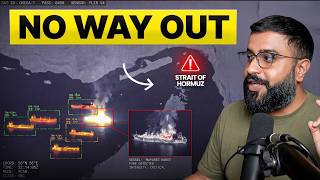 God's Eye View Reveals Iran's Chokehold on the Global Economy 700K views on YouTube |
 God's Eye View Just Got a Massive Upgrade (Thanks To You!) 502K views on YouTube |
More reconstructions, interviews and press: godseyeview.ai/press · the full series on YouTube
🔧 Dưới mui xe
Cách toàn cầu xử lý dữ liệu trực tiếp:
- Biểu tượng ổn định thế giới. Máy bay và tàu chỉ dọc theo tiêu đề thực tế ở mọi góc camera — được theo dõi hoặc không, nhìn thẳng xuống hoặc ngang qua đường chân trời — thông qua phép chiếu hướng không gian màn hình trên mỗi khung hình. Không quay, không khóa khung nhìn.
- Chuyển động mượt mà từ dữ liệu bị giật. Live feeds arrive every 15–30s, often minutes late; the globe renders as far behind real time as the feed is late (at least one interval) and draws each aircraft along a smooth curve between its known fixes. Dead reckoning fills the gaps.
- Các vệ tinh trung thực. Truyền sóng SGP4 với các vòng quỹ đạo luôn được khóa với các vệ tinh của chúng thông qua việc sắp xếp lại GMST - không trôi, không nhấp nháy mỗi giây.
- Ngồi trên mặt đất thực sự. Chiều cao của thực thể được căn chỉnh để hoạt động với các ô xếp 3D của Google, do đó, máy bay đậu trên tạp dề và máy ảnh đứng ở các góc phố thay vì nổi.
- Bộ nhớ đệm và yêu cầu ngân sách. Thống đốc tín dụng OpenSky, ngân sách ô hàng ngày của TomTom và TLE được lưu vào bộ nhớ đệm trên đĩa giúp giảm các yêu cầu lặp lại. Các biện pháp kiểm soát này không thay thế hạn mức nhà cung cấp hoặc kiểm soát thanh toán.
- Thông tin xác thực phía máy chủ. Mọi API chạm vào khóa riêng (OpenAI, AISStream, OpenSky OAuth, khung máy ảnh) đều được môi giới thông qua proxy phía máy chủ cứng với tính năng bảo vệ SSRF, giới hạn phản hồi và lỗi được loại bỏ. Các phím duy nhất mà trình duyệt nhìn thấy là Google Maps và ion Caesium (hạn chế cả hai ở nhà cung cấp).
- A small stack. Vue 3 và Pinia for the interface, CaesiumJS for the globe and Vite to build it — plus Gạch 3D ảnh thực tế của Google cho hành tinh và OpenAI Thời gian thực API cho giọng nói. Đọc nhanh, hack nhanh.
src/
├── main.js                 # Bootstrap: Google 3D tiles, layer registration
├── ui/                     # Runtime UI — Vue views, Pinia stores, kit, controllers, styles
├── hud.js                  # Intelligence HUD + AI scene summary
├── keySetup.js             # POWER UP panel — in-app provider keys (dev server only)
├── mapStackController.js   # Basemap switching — Google 3D / Esri / OSM / ion stacks
├── voice/                  # OpenAI Realtime session + 30 voice tools
├── layers/                 # Layer components — weather, wind, cyclones, transit, ALPR, …
├── data/                   # One module per layer + orchestration + context store
│   ├── iconOrientation.js  # Horizon backdrop for labels (headings: screenRotation.js)
│   └── local_data/         # Bundled datasets (per-folder provenance)
└── scenes/                 # Cinematic scene director
Xem docs/CURRENT-STATE.md để tham khảo thời gian chạy có thẩm quyền.
🔑 API Phím
🟢 Không có chìa khóa · 🟡 Chìa khóa miễn phí · 🔴 Đã đo
sử dụng BẬT NGUỒN → Cài đặt nhà cung cấp để thêm phím. Các bảng bên dưới giải thích những gì mỗi nhà cung cấp kích hoạt; không cần thiết phải bắt đầu. Xem hướng dẫn thiết lập để biết chi tiết về lưu trữ và cấu hình.
No key needed for Wind, Rain radar, Satellite clouds, Lightning density, Cyclone advisories, Mapped ALPR Cameras, Transit, Directions, Delaware live video, the News layer's Conflicts section, and coordinate or bundled-place search. A layer row waiting on a key names it.
Chọn các khả năng bạn muốn
Nine keys. Six have a free tier. Of the three 🔴 ones, Google Maps and OpenAI are metered and Liveuamap is a paid subscription:
| Chìa khóa | tại sao | Nhận nó | |
|---|---|---|---|
| 🟡 | Ion Caesium | 🗺️ Google Photorealistic 3D, địa hình thế giới và các ngăn xếp hình ảnh bổ sung được lưu trữ trên ion. Gói Cộng đồng miễn phí dành cho mục đích sử dụng cá nhân/phi thương mại đủ điều kiện và có hạn ngạch | caesium.com/ion - sử dụng công cộng assets:read mã thông báo và kiểm tra hiện tại giá cả/sự đủ điều kiện |
| 🔴 | Bản đồ Google | Direct Google Photorealistic 3D, Google place search and Street View (Ô bản đồ API; Street View also needs the Maps JavaScript API) | Bảng điều khiển đám mây của Google - hạn chế URL nó |
| 🔴 | OpenAI | 🎙️ Voice + AI HUD summary through an API key. Provider Settings also offers USE CHATGPT OAUTH for cloud voice without removing the API-key option | nền tảng.OpenAI.com — API-key usage is metered, see costs below |
| 🟡 | AISStream | 🚢 Tàu toàn cầu trực tiếp | aisstream.io - đăng ký miễn phí |
| 🟡 | CÔNG TY NASA | 🔥 Đốt cháy trực tiếp | công ty.modaps.eosdis.nasa.gov — miễn phí |
| 🟡 | TomTom | 🚦 Tốc độ luồng trực tiếp và màu tắc nghẽn cho lớp giao thông mô phỏng | my.tomtom.com — có sẵn bậc miễn phí |
| 🟡 | Mapillary | 📷 Street Level coverage and photos. A public client token by design (see SECURITY.md) | mapillary.com/dashboard/developers — register an app, copy its Client Token |
| 🟡 | World News API | 📰 News layer, Local: the news of the country in view. The free plan allows 50 points a day; WORLDNEWSAPI_DAILY_READS (default 30) keeps Core inside it. Core keeps each country's news for up to 1 hour, and World News API's terms allow caching only with its prior written permission, which is yours to get. The Data attribution popover credits it with a link |
worldnewsapi.com/console — free plan |
| 🔴 | Liveuamap | 📰 News layer, Conflicts: Liveuamap's mapped items beside GDELT's reports (🟢 Conflicts works without) | liveuamap.com/promo/API — paid API |
Anh đào trên cùng
| Chìa khóa | tại sao | Nhận nó | |
|---|---|---|---|
| 🟡 | OpenSky | ✈️ Nhiều tín dụng thăm dò chuyến bay hơn (🟢 ẩn danh hoạt động mà không có) | opensky-network.org |
| 🔴 | Khởi chạy Thư viện 2 | 🚀 Optional paid token for higher limits (🟢 no key needed for public access) | thespacedevs.com/supportus |
Add these if you need higher polling allowances. Leave LL2_API_TOKEN blank for standard public access. LL2 tokens are optional paid Patreon upgrades for higher limits; there is no free API-key signup.
npm run doctor báo cáo mức độ sẵn sàng của nút/npm, các tuyến của nhà cung cấp chính và nơi tìm thấy từng nhà cung cấp được định cấu hình mà không in các giá trị thông tin xác thực. Trên macOS, bản xem trước kết quả nhận biết chuỗi khóa của nó ./scripts/dev-fresh.sh; đồng bằng
npm run dev chỉ đọc môi trường rõ ràng và các giá trị dotenv Vite. Bản tóm tắt OpenSky báo cáo quyền truy cập ẩn danh không cần chìa khóa cho các anon or an OAuth mode without a client pair, retains presence-only wording for a complete OAuth pair, and identifies selected Basic or auto mode without guessing which credentials runtime will accept. Basic and credentials-file modes remain advanced dev-fresh.sh cấu hình.
Thiết lập nâng cao: biến môi trường và chuỗi khóa macOS
Đối với máy không có đầu, tác nhân mã hóa hoặc thiết lập theo tập lệnh:
# Put keys in .env (see .env.example), or pass them as env vars:
OPENAI_API_KEY="…" AISSTREAM_API_KEY="…" npm run dev -- --host localhost --port 4173

# On macOS, store any of them in the Keychain and dev-fresh.sh pulls them in:
security add-generic-password -U -s "google-maps-api" -a "api-key" -w
security add-generic-password -U -s "openai-api"      -a "api-key" -w
security add-generic-password -U -s "aisstream-api"   -a "api-key" -w
security add-generic-password -U -s "firms-map"       -a "map-key" -w
security add-generic-password -U -s "cesium-ion"      -a "token"   -w
OpenSky có thể chạy hoàn toàn ẩn danh (OPENSKY_AUTH_MODE=anon) hoặc nhập thông tin xác thực OAuth bằng ./scripts/opensky-import-client.sh /path/to/credentials.json.
Live video cameras (HLS)
Nguồn CCTV với "feedType": "hls" and a registered HTTP(S) .m3u8
URL phát qua bộ giải mã hls.js được tải từng phần được chia sẻ bởi mặt phẳng màn hình và bảng điều khiển. DelDOT sử dụng các liên kết danh mục HTTPS HLS chính thức của mình. Vô hiệu hóa gói đó với CCTV_DELDOT_ENABLED=0.
The server allows two concurrent sessions. Each retains at most 12 segments and 24 MiB in memory; individual downloads are capped at 8 MiB with a ten second deadline. There are no segment files or ffmpeg processes. Redirects, off-origin references, encrypted playlists and non-MPEG-TS segments are refused. Each decoder has its own client lease (at most eight per session), including native HLS. Closing it releases only that lease; abandoned leases expire after 15 seconds without access. The last release stops upstream work. Failed live video uses the existing still/Street View/synthetic fallback, which is not live video. RTMP-only sources are not supported by this integration.
💸 Chi phí thực sự của nó là bao nhiêu
Những con số trung thực, đại khái là vào giữa năm 2026 - hãy luôn kiểm tra các trang định giá của nhà cung cấp:
| Chi phí thực tế | |
|---|---|
| 🟢 Nhiều lớp nhất | $0, không cần đăng ký. OpenSky anon, USGS, CelesTrak, adsb.lol, city CCTV, Radio Browser, GBFS, Launch Library 2, transit feeds, OSRM routing, NOAA and ECMWF weather, OpenStreetMap ALPR mapping, GDELT news events, bundled datasets. |
| 🟡 Cấp khóa miễn phí | $0 khi đăng ký. AISStream, FIRMS, TomTom, OpenSky, World News API, plus Cesium ion for eligible personal/non-commercial use. Provider quotas and eligibility still apply. |
| 🗺️ Gạch 3D của Google | Miễn phí thông qua tài khoản Cộng đồng ion Caesium đủ điều kiện trong hạn mức của nó; được đo thông qua khóa Google trực tiếp. Sử dụng lộ trình trực tiếp để tìm kiếm địa điểm trên Google hoặc triển khai thương mại, xác minh các điều khoản của nhà cung cấp hiện tại và đặt thông báo ngân sách khi bật tính năng thanh toán. |
| 🔴 OpenAI giọng nói | API-key sessions keep the live spend readout, STD/MINI model toggle, $2 warning, and $5 hard cap. ChatGPT OAuth is an explicit choice in Provider Settings. Its usage is tracked without an API-dollar estimate or spend cap. The voice context window stays deliberately short. |
Lộ trình 3D trực tiếp của Google hào phóng đến mức đáng ngạc nhiên: 1.000 phiên Gạch 3D ảnh thực tế đầu tiên mỗi tháng hiện miễn phí và một yêu cầu gốc hỗ trợ khoảng ba giờ hiển thị. Một người dùng solo khám phá một cách tiết kiệm có thể thực sự ở trong giới hạn sử dụng miễn phí. Tính năng thanh toán vẫn phải được bật, vì vậy hãy hạn chế khóa và đặt cảnh báo hạn ngạch hoặc ngân sách. Kiểm tra Google giá hiện tại trước khi dựa vào những con số này.
🧗 Cố tình hạ sàn thấp
Mọi thứ ở trên là mức cơ bản có chủ ý rẻ - đủ để có được cảm nhận thực sự về trí thông minh không gian địa lý, GEOINT và OSINT mà không cần nói chuyện với nhóm bán hàng. Bạn cũng sẽ nhận thấy mức trần: AIS trên mặt đất hoạt động yên tĩnh giữa đại dương và AIS vệ tinh tốn tiền thật; hình ảnh cao cấp, SAR và nguồn cấp dữ liệu thương mại chuyên sâu hơn nằm sau các hợp đồng doanh nghiệp. Đó không phải là giới hạn của kiến trúc — mỗi lớp ở đây là một mẫu mà bạn có thể trỏ đến nguồn dữ liệu của riêng mình. Repo này trao cho bạn nền tảng; những gì bạn kết hợp vào nó là tùy thuộc vào bạn.
🔒 Chia sẻ một ví dụ
Theo mặc định, không ai khác có thể truy cập máy chủ của bạn - nó liên kết với localhost. Để chia sẻ trên mạng LAN của bạn, hãy chọn tham gia một cách rõ ràng (npm run dev -- --host 0.0.0.0 --port 4173hoặc HOST=0.0.0.0 ./scripts/dev-fresh.sh on macOS/Linux). IP addresses work as they are; if you use a LAN hostname, add it with GEV_ALLOWED_HOSTS=globe.lan, since binding to 0.0.0.0 does not trust arbitrary Host headers. But know that ⚠️ máy chủ hiển thị trong mạng LAN cung cấp khóa API đã định cấu hình của bạn cho bất kỳ ai có thể truy cập được. Per-IP throttles on the cost-bearing endpoints are on by default (GEV_RATELIMIT_OPENAI_PER_MIN, GEV_RATELIMIT_GOOGLE_PER_MIN - xem .env.example to tune them), but before anything else, định cấu hình hạn ngạch của nhà cung cấp, giới hạn sử dụng và thông báo thanh toán: Bộ điều chỉnh cấp ứng dụng không phải là giới hạn thanh toán và chỉ riêng cảnh báo ngân sách cũng không ngừng chi tiêu. Mô hình mối đe dọa đầy đủ trong BẢO MẬT.md.
Cài đặt nhà cung cấp bị tắt khi máy chủ được chia sẻ, do đó người dùng từ xa không thể truy cập bảng nhập khóa.
Tính năng chia sẻ Pinokio LAN và Cloudflare vẫn bị tắt đối với trình khởi chạy này. Sử dụng proxy xác thực được xem xét riêng nếu cần truy cập từ xa. BẢO MẬT.md giải thích các hạn chế và mô hình mối đe dọa.
📋 Có trách nhiệm và cởi mở
God's Eye View tiếp tục hoạt động dữ liệu công khai, nguồn rõ ràng và thực thi cục bộ đầu tiên. Không có bí mật, không có tập dữ liệu riêng tư, không có hoạt động thu thập dữ liệu bí ẩn — mọi thứ liên quan đến khóa riêng tư đều được môi giới phía máy chủ. Nó có ngữ pháp trực quan của một phòng điều hành mật, được xây dựng hoàn toàn từ các tín hiệu mở và mã có thể kiểm tra được.
Đường dây. Dự án này mô hình sự kiện, tài sản, cơ sở hạ tầng và hệ thống — máy bay, tàu thuyền, vệ tinh, hỏa hoạn, máy ảnh, thành phố. Nó không xây dựng các tính năng để tìm kiếm theo tên người, nhận dạng khuôn mặt hoặc theo dõi các cá nhân và các yêu cầu kéo vượt qua dòng đó sẽ không được hợp nhất. Mọi người không phải là một loại truy vấn ở đây.
Hãy xây dựng nó. Đây là ứng dụng khách 3D trực tiếp chuẩn mực từ dự án đã khởi động làn sóng công cụ trí tuệ không gian gần đây — và đó là một bức vẽ: các lớp ở đây là tín hiệu mà một người có thể tìm thấy và hợp nhất. Thêm gói thành phố, nguồn dữ liệu, kiểu, công cụ giọng nói. Đó là cửa sổ qua đó bạn nhìn thế giới; mang cửa sổ đó đến cho người khác.
Tình trạng: Một ứng dụng khách nguồn mở đang phát triển để khám phá và học hỏi — một nền tảng nhanh, có thể hack được chứ không phải một dịch vụ sản xuất cứng nhắc. Được phát hành dưới sự Giấy phép MIT. Các bộ dữ liệu trực tiếp và được đóng gói có các điều khoản riêng - xem DATA_SOURCES.md. Mô hình bảo mật: BẢO MẬT.md. Bạn muốn đóng góp? ĐÓNG GÓP.md.
Người bảo trì: Bilawal Sidhu và Sameh Khamis tại Nửa pixel.
Media note: the clips on this page are the ones shown on godseyeview.ai. Some show Google Photorealistic 3D Tiles and live data layers, used promotionally with in-frame attribution; they aren't licensed for standalone reuse. See nguồn gốc và quyền của phương tiện truyền thông; điều khoản nguồn đầy đủ trong DATA_SOURCES.md.
[!QUAN TRỌNG] God's Eye View là một hình ảnh trực quan mang tính khám phá về dữ liệu công cộng và bên thứ ba. Dữ liệu có thể bị trì hoãn, không đầy đủ, được mô hình hóa, suy luận hoặc sai. Không sử dụng nó cho mục đích điều hướng chuyến bay hoặc hàng hải, ứng phó khẩn cấp, quyết định về y tế hoặc sức khỏe, quyết định đầu tư hoặc các mục đích vận hành hoặc quan trọng về an toàn khác. Xác minh thông tin quan trọng với các nguồn có thẩm quyền.
🧭 Điều gì tiếp theo
Đầu tiên - cảm ơn bạn. Gửi tới tất cả những người đã xem các bản demo của God-view và bắt đầu xây dựng bản demo của riêng họ cũng như cho tất cả những người liên tục yêu cầu mã: Tôi rất biết ơn. Và khi tôi thăm dò xem liệu điều này có nên chuyển sang nguồn mở hay không, bạn đã không tinh tế về điều đó:

Vì vậy, nó ở đây. Bước vào bên trong buồng lái của phim gián điệp ly kỳ — ngoại trừ dữ liệu là có thật — và hãy biến điều này thành hộp cát chung của chúng ta để hiểu về thế giới và tận hưởng niềm vui khi làm điều đó. Kho lưu trữ này là đường cơ sở, nó vẫn mở và mục đích chung là để bạn phá vỡ mọi thứ và bắt kịp các lớp mà chúng tôi chưa nghĩ tới.
Lưu ý từ bên trong: xây dựng trong không gian này trong một tuần và bạn sẽ học được điều đó hiện tại là phần rẻ tiền. Khoảnh khắc bạn cố gắng quay ngược thời gian - lát gạch, dọn dẹp và lau chùi chuyện gì đã xảy ra và điều gì đã thay đổi ở bất kỳ độ phân giải thực nào - dữ liệu trở nên đắt đỏ và việc tính toán trở nên khó khăn. Đó là trò chơi dài.
Cập nhật - sắp có phiên bản được lưu trữ trên máy chủ. Ban đầu chúng tôi dự định giữ kho lưu trữ này làm ứng dụng khách nguồn mở và xây dựng một sản phẩm chuyên nghiệp riêng biệt. Sau đó, buổi ra mắt diễn ra và yêu cầu lớn nhất không phải là một tính năng khác — đó là "chỉ cần cho tôi một liên kết." Vì vậy, chúng tôi đang xây dựng một God's Eye View được tổ chức chính thức tại Nửa pixel: no installation, just open it in your browser. The hosted version is the easiest way into this open-source project. Sign up for the waitlist and get notified.
🌐 godseyeview.ai, the official site · ▶️ Xem loạt phim God's Eye View · 📬 Bản đồ thế giới - bản tin đằng sau dự án
🌐 Tầm nhìn của Chúa. Không có nơi nào bị bỏ lại phía sau.
Dự án cùng danh mục

Tài liệu tham khảo chuẩn cho Astrid: kernel, viên nang, ABI máy chủ, IPC và mô hình bảo mật.

Một kho lưu trữ duy nhất các PoC khai thác công khai và các bài viết nghiên cứu về lỗ hổng bảo mật. Tại thời điểm tôi đăng những điều này, không có gì được báo cáo. Vui lòng tự báo cáo và ghi công cho CVE nếu được trao lulz. Xin đừng lạm dụng những điều này. Tôi làm điều này để thu hút mọi người tham gia vào lĩnh vực này và tôi luôn thấy đây là cách hiệu quả nhất.

Hướng dẫn về mã Python
giấy phép:apache-2.0, khu vực:us